"Yaar I am really struggling with working with developers. I am not able to visualise how this stuff works. Is tech important for becoming an APM?"
I got this message a few days ago from a friend of mine who is a designer but trying to shift to APM role in her organisation. She is a great designer but doesn't come from a tech background, hence is struggling with how to think about products from a tech perspective.
A lot of people from non-tech and non-engineering background shift to product roles frequently. I think a lot of them face the same issue. One such topic is API, which to be honest, people with tech knowledge might not even understand fully if they are not an engineer. So, I decided to write this guide for non-technical product managers.
What is an API?
Imagine you have a remote-controlled car that you really enjoy playing with. This car can do all sorts of cool things like moving forward, backward, left, and right. But to make the car do what you want, you need to use the remote controller.
The remote controller has different buttons that send specific instructions or commands to the car. Each button on the remote is like a special request or message that tells the car what to do.
For example, when you press the "forward" button on the remote, it sends a message or command to the car that says "go forward." The car then receives this message and knows to start moving forward.
An API (Application Programming Interface) is like that remote controller, but for computers, phones, and apps instead of a toy car. APIs allow different software programs or applications to communicate with each other by sending instructions or requests, just like the buttons on the remote controller.
So if you have a weather app on your phone that needs to get the latest temperature information, it can use an API to send a request or message to a weather service's computer. This API request is like pressing a button on the remote that says "give me the current temperature."
The weather service then receives this API request, processes it, and sends back the temperature data to the weather app, just like the toy car moving forward when you press the "forward" button.
An Application Programming Interface, or API, is in its simplest sense a technology that connects two systems. They are the most important piece for seamless integration and functionality across different software applications.
Why are APIs important for product managers?
As a product manager, you need to be aware of the technical solution your team builds or utilizes along with their advantages and limitations. This knowledge helps you make better product decisions.
But other than all these benefits, APIs open up a lot of business opportunities too which can be leveraged by the company to meet business goals and expand the market share.
To get the full benefits of these opportunities businesses typically utilise APIs in 2 ways:
1. Integrating their products with third party APIs
Connecting with other company's APIs allows you and your product to fast track adding features, functionality and tools that would otherwise take you and your team years to build.
Also, the dev effort is low for the business impact / value provided if you use an API instead of building things from scratch.
By integrating with analytics platforms, CRM systems, or other data sources, product managers can gain valuable insights into user behavior, product performance, and market trends. This data-driven approach helps prioritize features, allocate resources effectively, and optimize the product roadmap.
Most products today utilise integrations with APIs in one way or another. Here's a few examples of open APIs that are widely used by millions of websites around the world today:
- Google Maps API
- Stripe API
- YouTube API
APIs also offer flexibility, allowing product managers to adapt and evolve their products over time. They can modify the underlying infrastructure, technology stack, or features without disrupting existing integrations.
This allows product managers to act fast on user feedback, or emerging trends, hence keeping their products competitive and relevant.
But it's not the perfect solution. There are some downsides to using third party APIs for the core of your product which need to be considered:
- Dependencies: if your entire product is underpinned by third party APIs you become over-reliant on external APIs which creates dependencies
- Risk: what happens when that new startup you've been using to process your mobile payments goes bust? You go bust with it. When choosing partners with APIs to use, pick ones you think will be around in 5 years time.
- Costs: costs increase as third parties can charge on a per request basis. Twilio charges for every single text message sent, for example. A great business model for them, not so great for you if it's not factored into your growth models.
Developing and Offering Your Own APIs to Customers
Another strategy for companies is to develop and offer their own APIs as a service to other businesses.
By doing this, product managers can build ecosystems around their products, enabling developers to enhance functionality, create integrations, or develop complementary services. A notable example is the OpenAI API.
For some businesses, APIs are central to their value proposition; the company's value to customers is delivered primarily through APIs. Twilio is an example of this, allowing companies to send text messages to customers based on user actions.
However, if you're considering offering your own APIs and they are not a core part of your business, but rather a potential supplementary opportunity, you need to carefully evaluate this decision. Here's what you should consider:
- What will be the business impact if we create our own APIs?
- How much additional revenue or how many more customers can we expect?
- Will having an external API help us achieve our goals? Provide specific projections and support them with data.
- Is your company prepared for the additional costs and complexities of managing an external API infrastructure?
- If we proceed, how will we measure and demonstrate the API's impact on our business?
How does an API work?
Let's look at some real world examples to see where and how APIs are used and why they are considered so useful.
Let's take Swiggy for an example
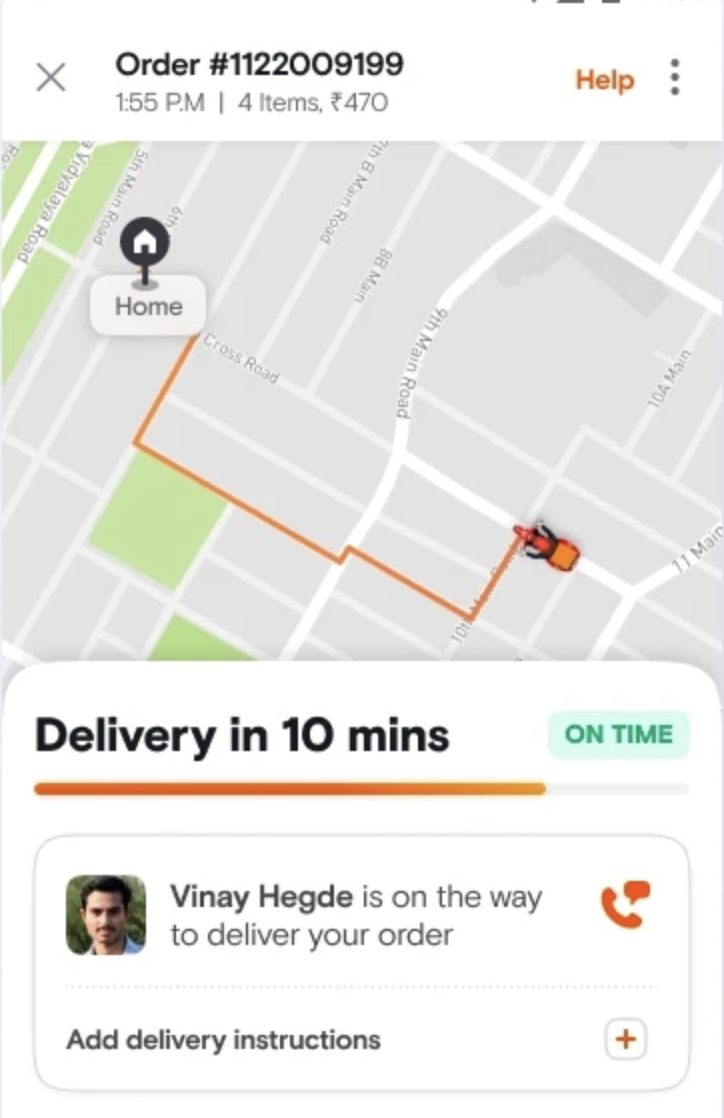
Swiggy uses mapping and location services to determine the user's location, display nearby restaurants, and provide delivery estimates.
Have you ever thought, how does Swiggy know where the driver is at every point of time and how do they know the distance between that point and your location?
Obviously they are using maps, to be specific, they are using a service like Google Maps. But they don't own Google Maps, so how are they using it?
They are using Google Maps API to access information. Services like Google Maps APIs allow Swiggy to retrieve map data, geocode addresses, and calculate routes and distances.
- When you give the location access to Swiggy, it determines your exact location.
- When the delivery partner is out with your order, they also determine the exact location of that delivery partner using GPS.
- Now, as they have the information of both the points they have to find the distance between, they make an API call (send request to Google Maps) with both locations and ask for the distance and time between these two locations in response.
- Google Maps sends a response with the required information and Swiggy uses that response to show you the time in which your order will be delivered based on the delivery partner's location.
Important terms you need to know that are related to API
Request and Response
APIs operate on a request-response model. One application or system, the client, sends a request to another application or system, the server, through the API.
The request usually includes information about what data or functionality is needed, along with any parameters or data required for that request.
The server then processes the request and sends back a response. That response can contain the data the client asked for, a confirmation that something was created or updated, or an error message if something went wrong.
For example, when Swiggy asks Google Maps for the distance between the delivery partner and your location:
- Swiggy sends a request with both locations.
- Google Maps receives and processes that request.
- Google Maps sends a response with distance, route, and estimated time.
- Swiggy uses that response to show the delivery estimate in the app.
REST
REST is a set of principles that need to be followed in order to classify your API as a RESTful API. This uniformity makes it easier for developers to work with many different APIs.
Think of REST as a set of members club rules. The owner of the club is saying, "hey guys, look, if you want to be part of this REST club, you're going to have to follow a certain set of rules."
REST APIs commonly use the same HTTP methods:
- POST
- GET
- PUT
- PATCH
- DELETE
HTTP Methods
When working with APIs, you interact with them using HTTP methods, which are like commands or actions that you can perform on the data.
The most commonly used HTTP methods are:
- GET: This method is used to retrieve or read data from the API. You are not creating, modifying, or deleting any data. You are simply requesting to receive it.
- POST: This method is used to create or submit new data to the API. You are adding something new to the system.
- PUT: This method is used to update or replace an existing resource entirely with new data.
- PATCH: This method is similar to PUT, but it is used to update or modify only a part of an existing resource, rather than replacing it entirely.
- DELETE: This method is used to remove or delete a resource from the API.
These HTTP methods are often referred to as verbs, because they describe the action being performed on the data.
API Endpoints
An API endpoint is a unique URL or address that represents a specific resource or functionality provided by an API.
It acts as an entry point for clients, such as applications, websites, or other systems, to interact with the API and access the resources or services it offers.
Think of an API as a complex system with different rooms or sections, each serving a specific purpose. The API endpoints are like doors or entrances to those rooms. Each endpoint has a unique address or URL that tells the API where to look and what to do.
API Calls
The requests to APIs are often referred to as API calls.
API calls involve hitting an endpoint with the expectation that the API will respond with the information you need.
For example, if you are using Spotify API, you call the albums endpoint with a specific album ID and Spotify responds with information about that album.
Payloads
Payload is a fancy word for the response you get from an API.
It refers specifically to the meaningful information in a given set of data. Not everything in an API response is something we care about, so the term payload is used to distinguish between the useful information and the extra technical metadata around it.
For example: "If you check the payload from the Spotify API, you can see the length of the track is 3 minutes."
Response Codes
Every time you get a response from an API, it comes with its own response code, which is simply a number with a meaning attached to it.
HTTP response code 200 means success, which means everything is fine.
The most famous error code is 404. It means the server cannot map the request to a resource.
As a PM, you do not need to memorize every response code, but you should understand that these codes help engineering teams quickly identify whether an API request succeeded, failed because of the client, or failed because of the server.
API Documentation
API documentation is a set of instructions and explanations that describe how to interact with and use an API.
It serves as a guide for developers, giving them the necessary information to understand the capabilities, functionalities, and rules of the API.
Good API documentation usually explains:
- What endpoints are available
- What each endpoint does
- What request format is expected
- What response format will be returned
- What authentication is required
- What errors can happen
- Example requests and responses
As a PM, API documentation matters because poor documentation increases integration time, developer frustration, support load, and customer drop-off.
Authentication
You must be familiar with authenticating yourself when logging into your email or any other online account using a username and password. You need to do something similar for accessing APIs.
If you have an external-facing API that needs to be accessed by clients, they will typically be issued a security token and credentials which they need to use to access your API.
Authentication usually includes:
- Username
- Password
- Access token
This makes sure that not everyone can access the API or misuse the data behind it.
Where do we go from here?
This brief introduction aims to provide an overview of APIs and how they can be relevant in your role as a Product Manager when engaging with stakeholders.
However, this is just the tip of the iceberg. Building or integrating APIs involves a lot of complexity that goes beyond the fundamentals covered here.
If you are genuinely interested in delving deeper into the world of APIs, there is a wealth of knowledge waiting to be uncovered. This introductory overview has merely scratched the surface, and there is a vast expanse of information and practical skills to be acquired.
As a PM, you do not need to become an engineer to work with APIs. But you should understand the vocabulary, the business tradeoffs, the user impact, and the technical constraints well enough to have better conversations with your engineering team.
Put your API knowledge into practice
Choose an integration you use, such as signing in with Google or paying through a checkout provider. Sketch the client, API, service, data returned, failure states, and user-facing recovery. Then answer: Who owns uptime? How is access authenticated? What is rate-limited? What data is sensitive? This is the level of technical reasoning most PM conversations require.
Try a technical product management practice case, or strengthen the product side with the product discovery guide.